Main Guide:Always-On AI Recorder: How One Device Replaced My Meeting Notes and Became My Executive Assistant
How a Plaud Note User Discovered the Power of AI Summary — And the One Feature That Would Make It Perfect
There's a moment in every professional's week — maybe it happens on a Tuesday afternoon, maybe it's during a Friday morning standup — when you realize you've been in back-to-back meetings for three hours and you can barely remember what was discussed in the first one. The action items blur together. The brilliant idea someone pitched in the second meeting? Gone. The follow-up question your manager asked you to look into? You wrote it on a sticky note that's now buried under your laptop.
This is the modern knowledge worker's curse: we spend our days swimming in conversations, but we're terrible at retaining the details that actually matter.
For one Plaud Note user, this problem had become more than a minor inconvenience — it was actively slowing down their work. But when they discovered an AI-powered recording device that promised to capture, transcribe, and summarize every conversation with precision, everything started to change. Well, almost everything.
This is their story — and it's one that thousands of professionals navigating the age of AI-assisted productivity will immediately recognize.
The Challenge: Drowning in Meetings, Starving for Context
If you've ever walked out of a meeting and immediately thought, "Wait, what did we actually decide?" — you understand the problem at its core. It's not that the meetings themselves are unproductive. It's that our brains aren't built to serve as perfect recording devices. We lose nuance. We forget context. And when we try to reconstruct what happened hours or days later, we're working from fragments.
For professionals who depend on accurate meeting records — project managers, consultants, team leads, salespeople — this gap between what was said and what was remembered can have real consequences. Missed deadlines. Duplicated work. Miscommunication with clients. The slow erosion of trust that happens when someone says, "I thought we agreed on something different."
Traditional note-taking has its limits. Even the most diligent note-taker can't capture every word while also actively participating in a conversation. And let's be honest: most of us aren't diligent note-takers. We jot down half-sentences, abbreviate key points into cryptic shorthand, and hope that future-us will somehow decode it all.
What this user needed wasn't just a recording tool. They needed something that could serve as a context memory — an intelligent system that didn't just capture audio but understood it, organized it, and made it actionable.
The Discovery: Enter Plaud Note
The Plaud Note entered this user's life the way most great productivity tools do: through a combination of frustration and curiosity. After cycling through phone-based recording apps, generic transcription services, and even the occasional attempt at hiring a virtual assistant to take notes, they stumbled upon Plaud Note — a dedicated AI recording device designed specifically for capturing and processing conversations.
What set Plaud Note apart from the apps and services they'd tried before was its focus. This wasn't a general-purpose tool trying to be everything to everyone. It was purpose-built for one thing: turning spoken words into structured, useful information. The promise of precise transcription accuracy, intelligent AI summary capabilities, and actionable outputs was exactly what they'd been searching for.
The decision to try it wasn't complicated. When you've spent months (or years) losing critical information from meetings, a dedicated device that promises to solve that exact problem feels less like a luxury and more like a necessity.
The Experience: Precision That Earns Trust
From the very first recording, something felt different.
The user described the AI-generated breakdown of their meetings as "point on and precise" — and that precision is worth pausing on, because it's the foundation everything else is built upon. If you don't trust the transcription, you won't trust the summary. If you don't trust the summary, you won't use the tool. Accuracy isn't just a feature — it's the feature that makes every other feature possible.
With Plaud Note, the transcription captured not just the words but the meaning behind them. Conversations that would have been reduced to a few scribbled bullet points in a notebook were now fully preserved, searchable, and reviewable. The context memory that this user had been missing — the ability to go back and recall exactly what was said, by whom, and in what context — was suddenly available at their fingertips.
But the transcription was just the beginning.
AI Suggestions That Actually Help
One of the features that genuinely surprised this user was the AI suggestions. We've all become a little jaded about AI-powered features — too many products slap "AI" on basic functionality and call it innovation. But Plaud Note's suggestions proved genuinely useful.
After each recording, the AI didn't just produce a wall of text. It analyzed the conversation, identified key themes, and offered intelligent suggestions about next steps and important takeaways. For someone accustomed to spending 20-30 minutes after each meeting trying to reconstruct what happened, having an AI assistant that could surface the most important moments was transformative.
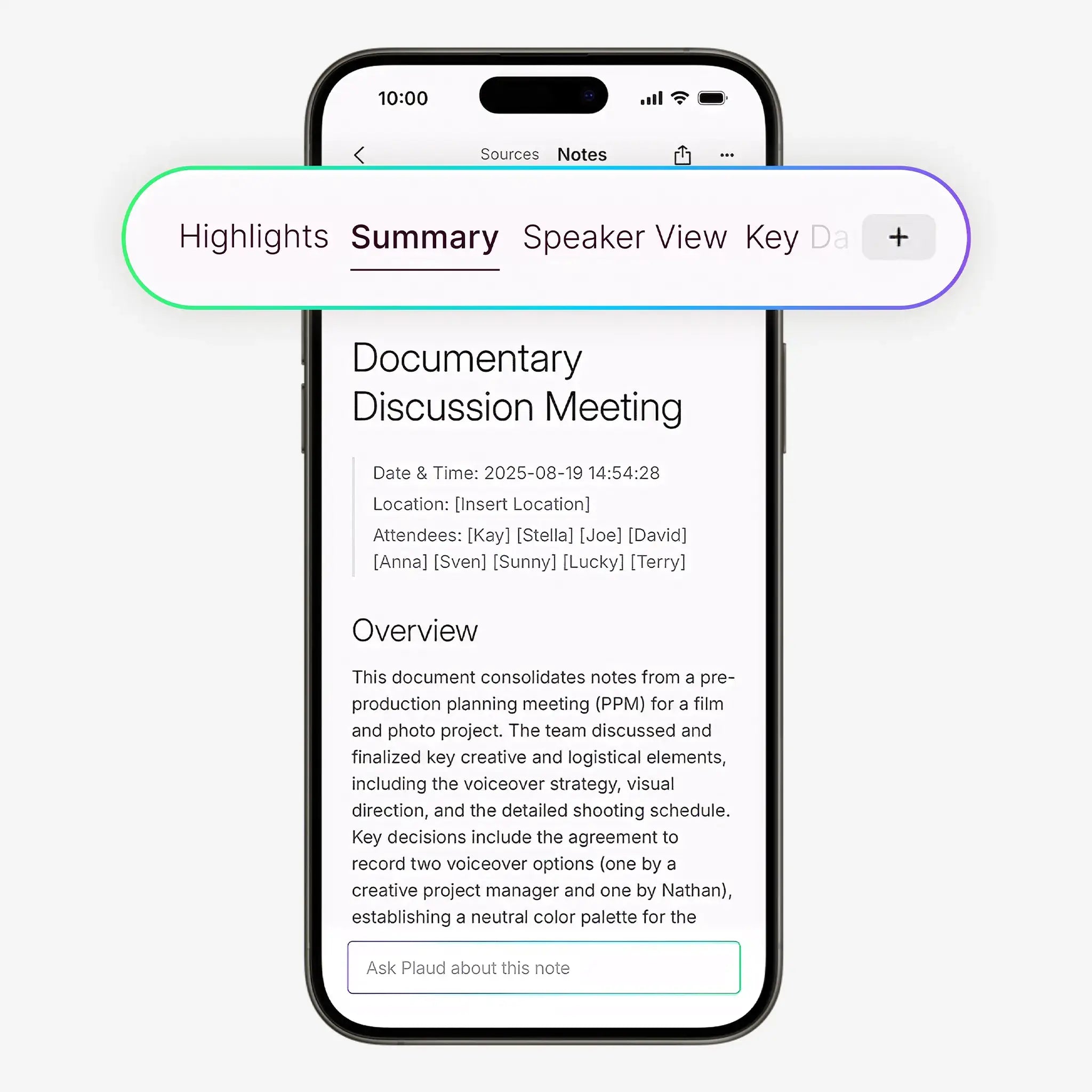
The AI summary feature condensed hour-long meetings into digestible overviews without losing the critical details. It was like having a brilliant colleague who sat in on every meeting, took perfect notes, and then handed you a clean executive summary before you even asked for one.
The To-Do Checklist: Where Knowledge Becomes Action
Perhaps the feature this user loved most was the to-do checklist. And honestly, it makes sense — because this is where passive information becomes active productivity.
Meetings generate action items. That's largely the point. But how many of those action items actually get captured, assigned, and followed up on? In most organizations, the answer is depressingly few. Tasks fall through the cracks not because people don't care, but because the systems for capturing them are broken.
Plaud Note's AI-generated to-do checklist changed that equation. By automatically extracting action items from conversations, it created an instant bridge between discussion and execution. No more scrolling through pages of notes trying to find the one sentence where someone said, "Can you handle that by Thursday?" The checklist was right there, organized and ready to act on.
For this user, the to-do checklist wasn't just convenient — it was the feature that justified the entire investment.
The Honest Verdict: 4 Out of 5 Stars — And Here's Why It's Not 5
This is where the story gets interesting, because the user's experience wasn't flawless. They gave Plaud Note 4 out of 5 stars — a strong rating, but one that reflects genuine room for improvement.
Feature Request #1: Document Export Options
The first gap the user identified was the lack of easy document export options. After Plaud Note generates its precise summaries, to-do lists, and transcriptions, the natural next step is sharing that information with colleagues, clients, or stakeholders. But without a straightforward way to export content as a PDF or Word document, distribution becomes unnecessarily friction-filled.
This is a feature request that resonates broadly. In professional environments, PDF and Word documents remain the lingua franca of information sharing. Email attachments, shared drives, client portals — they all expect standard document formats. The ability to go from recorded conversation to polished, shareable document in one or two clicks would elevate Plaud Note from a personal productivity tool to a team-wide communication asset.
Feature Request #2: Deeper AI Interaction
The second piece of feedback was equally compelling: the user wished they could ask more in-depth questions and get further responses from the transcript. In other words, they wanted the AI to be not just a summarizer but a conversation partner — something you could interrogate, probe, and explore.
Imagine finishing a complex strategy meeting and being able to ask the AI: "What were the three main objections raised about the Q3 timeline?" or "Summarize everything that was said about the budget constraints." This kind of deep, interactive engagement with transcript data would transform Plaud Note from a recording device into a true context memory system — one that doesn't just store information but helps you think through it.
This is the frontier of AI-assisted productivity, and the fact that this user is already envisioning it tells you something important: Plaud Note has earned enough trust and delivered enough value that its users are eager for it to do even more.
The Results: What Actually Changed
Despite the wishlist items, the impact of Plaud Note on this user's workflow was significant:
- Meeting recall went from fragmented to complete. No more reconstructing conversations from memory or cryptic notes.
- Action items stopped falling through the cracks. The AI-generated to-do checklist created accountability where there was previously ambiguity.
- Post-meeting processing time dropped dramatically. Instead of spending 20-30 minutes writing up notes, the user could review a polished AI summary in minutes.
- Confidence in follow-ups increased. When you know exactly what was said and agreed upon, you show up to the next conversation prepared and credible.
These aren't marginal improvements. For a professional who spends a significant portion of their week in meetings, this kind of efficiency gain compounds over time. An hour saved per day on meeting-related overhead translates to five hours per week — that's more than half a workday reclaimed for actual deep work.
Is Plaud Note Right for You?
If you recognize yourself in this story — if you've ever lost critical information from a meeting, struggled to distribute notes to your team, or wished you had a perfect memory of every professional conversation — then Plaud Note deserves a serious look.
It's not a perfect tool. The document export limitations and the boundaries of its AI interaction capabilities mean there's still a gap between what it does and what it could do. But what it does today — precise transcription, intelligent AI summaries, actionable to-do lists — it does exceptionally well.
For professionals who live and die by the quality of their meeting follow-through, those capabilities alone may be worth the investment. And if Plaud Note continues to evolve based on the kind of thoughtful feedback this user provided, the gap between 4 stars and 5 stars may close sooner than you think.
Frequently Asked Questions
How accurate is the Plaud Note's transcription?
Based on user feedback, the transcription accuracy is described as "point on and precise." The AI does an excellent job of capturing spoken words faithfully, which serves as the foundation for reliable summaries, action items, and to-do checklists. As with any transcription tool, accuracy can vary depending on audio quality, background noise, and speaker clarity, but the consensus among users is that Plaud Note performs at a high level.
Can I export Plaud Note summaries as PDF or Word documents?
As of this writing, easy document export in PDF or Word format is one of the most commonly requested features. While the device excels at generating summaries and to-do lists within its ecosystem, users have noted that sharing those outputs in standard document formats requires workarounds. This is a feature request that Plaud Note users are actively advocating for.
Can I ask the Plaud Note AI follow-up questions about my recordings?
Plaud Note offers AI suggestions and summaries based on your recordings, but some users have expressed a desire for deeper, more interactive Q&A capabilities — the ability to ask specific, in-depth questions about the transcript and receive detailed responses. This represents an area of potential growth for the platform as AI capabilities continue to advance.
Is Plaud Note worth it for someone who attends a lot of meetings?
Absolutely. If meetings are a significant part of your professional life, Plaud Note can dramatically reduce the time you spend on post-meeting processing while improving the accuracy and completeness of your records. The AI summary and to-do checklist features alone can save hours per week and help ensure that nothing important slips through the cracks.
Ready to stop losing critical information from your meetings? Plaud Note's AI-powered transcription and summary features can transform the way you capture, organize, and act on every conversation. Try Plaud Note for yourself and experience the difference that precise, intelligent meeting capture can make in your workflow.
Further Reading: