Main Guide:How to Use Plaud Note as a Voice-First Workflow Hub for Digital Organization Related:How to Record Interviews with AI: Plaud Note Recording Quality, App Experience, and Offline Guide
Plaud Note Review: Customer Support, Portability & Recording Quality That Impress
When you're shopping for an AI-powered recording device, the specs on the product page only tell part of the story. What really matters is how the device performs in your daily life — and what happens when you need help. In this in-depth review, we explore the Plaud Note through the lens of a real user who was pleasantly surprised by the device's customer support, compact design, effortless portability, and outstanding recording quality.
Whether you're a journalist, a student, a busy professional, or someone who simply wants to capture conversations and meetings without fuss, read on to discover why the Plaud Note has earned a loyal following — and how you can get the most out of it, even when you're offline.
What Is the Plaud Note?
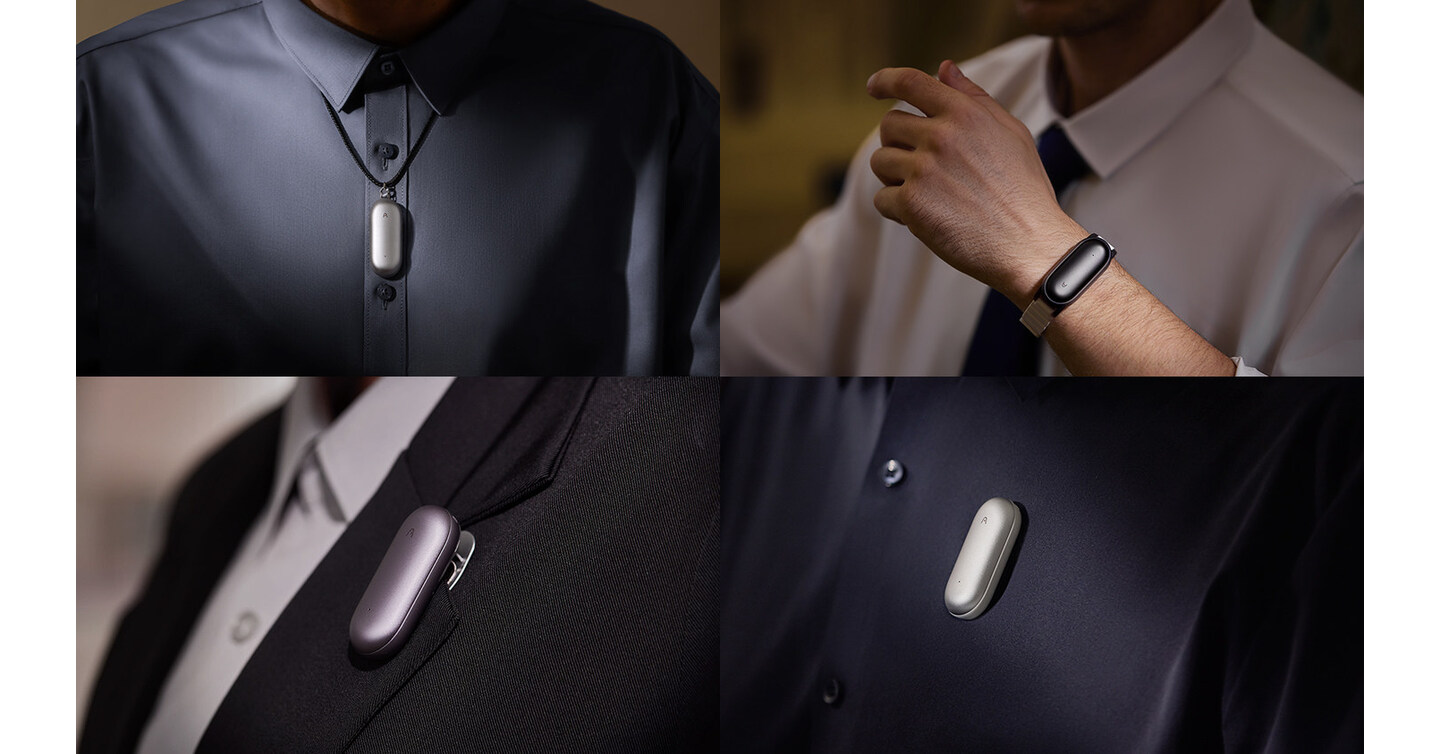
The Plaud Note is a sleek, credit-card-sized AI recording device designed to capture conversations, meetings, lectures, and interviews with remarkable clarity. Unlike bulky voice recorders of the past, the Plaud Note slips easily into a wallet, pocket, or the center of a conference table without drawing attention.
But it's more than just a recorder. The Plaud Note leverages AI-powered transcription and summarization to turn raw audio into structured, actionable notes. It's built for people who value both recording quality and convenience — and who don't want to wrestle with complicated apps or clunky hardware.
what-is-plaud-note-complete-guide
Customer Support That Actually Responds: A Refreshing Experience
One of the standout observations from the review that inspired this article was about customer support. The user reached out with a question about tracking usage minutes — a practical concern when deciding which subscription plan to choose — and received a response in under four hours.
In an industry where customer support emails can disappear into a void for days (or weeks), this is a notable differentiator. Here's why responsive customer support matters so much for AI recording devices:
Why Customer Support Matters for AI Devices
-
Subscription plan questions: The Plaud Note operates on a tiered plan system. Knowing how many minutes you've used helps you choose the most cost-effective option. The fact that this information is accessible in the settings — as confirmed by the support team — is a smart design choice.
-
Firmware and app updates: AI devices evolve rapidly. When a new feature rolls out or a bug needs fixing, having a responsive customer support team ensures you're never stuck.
-
Data privacy concerns: Recording devices handle sensitive information. Quick, transparent communication from the support team builds trust.
-
Onboarding assistance: Not everyone is tech-savvy. A support team that replies in hours rather than days can mean the difference between a returned product and a delighted customer.
How to Contact Plaud Note Customer Support
If you ever need to reach out to the Plaud team, here are some best practices:
- Use the in-app support option for the fastest response times.
- Be specific in your question — include your device model, app version, and a clear description of the issue.
- Check the FAQ and settings first. As the reviewer discovered, many answers (like tracking your usage minutes) are already built into the app's settings menu.
plaud-note-subscription-plans-compared
Design and Portability: Small Enough to Forget, Powerful Enough to Remember
The reviewer highlighted one of the Plaud Note's most praised attributes: its portability. The device's ultra-slim design means it can sit in the middle of a conference table "without others being distracted." This is a critical advantage for several reasons.
The Importance of Discreet Design in Recording Devices
Traditional voice recorders — even modern digital ones — tend to look like, well, recording devices. They create a psychological barrier. People become self-conscious, guarded, or distracted when they see a recorder on the table.
The Plaud Note solves this problem elegantly. Its design resembles a thin card or a minimalist accessory rather than a piece of surveillance equipment. This makes it ideal for:
- Business meetings where you want candid, natural conversation
- Interviews where putting the subject at ease is essential
- Therapy or coaching sessions where discretion is paramount
- Lectures and seminars where you don't want to fumble with equipment
Portability That Fits Your Lifestyle
The Plaud Note's portability goes beyond just being small. Consider these real-world scenarios:
- Commuters: Slip it into your phone case or wallet. When an idea strikes on the train, you're ready to record.
- Travelers: No need to pack a separate device bag. The Plaud Note takes up less space than a pack of gum.
- Students: Carry it between classrooms without adding weight to an already heavy backpack.
- Remote workers: Place it next to your laptop during video calls for a high-quality local backup recording.
The compact design also means fewer excuses not to have it with you. The best recording device is the one you actually carry — and the Plaud Note makes carrying effortless.
best-portable-ai-recorders-compared
Recording Quality: "Brilliant" Sound in a Tiny Package
The reviewer used one word to describe the recording quality: "brilliant." But what makes the Plaud Note's audio capture stand out in a crowded market?
What Defines Great Recording Quality
When evaluating recording quality in an AI device, several factors come into play:
- Microphone sensitivity: The Plaud Note uses high-quality microphones that capture voices clearly even from several feet away — perfect for placing in the center of a table.
- Noise reduction: Advanced algorithms filter out background noise, ensuring that the primary speaker's voice comes through cleanly.
- Bitrate and format: The device records at a bitrate that balances file size with audio fidelity, making it practical for long meetings without sacrificing clarity.
- Multi-directional capture: Because the device is designed to sit on a table, it captures sound from all directions — essential for group meetings and roundtable discussions.
Tips for Maximizing Recording Quality
Even with a device as capable as the Plaud Note, a few best practices can elevate your results:
- Place it centrally. As the reviewer noted, the Plaud Note works best in the middle of a table. This ensures equidistant audio capture from all participants.
- Minimize background noise. Close windows, turn off fans, and silence phone notifications before recording.
- Avoid covering the microphone. The slim design means it's tempting to stack papers on top of it — resist the urge.
- Test before important sessions. Do a quick 30-second test recording to check levels and positioning.
- Keep the firmware updated. Audio processing improvements are often delivered through software updates.
how-to-improve-ai-recorder-sound-quality
How to Use Plaud Note Offline: A Practical Guide
One of the most common questions about AI-powered recorders is whether they work without an internet connection. The good news is that the Plaud Note's core recording functionality works perfectly offline. Here's how to make the most of it.
Step-by-Step: Recording Offline with Plaud Note
- Charge the device fully before heading into an area without Wi-Fi or cellular service.
- Open the Plaud Note app and ensure your device is paired via Bluetooth.
- Start recording using the physical button on the device — no internet required.
- The audio is stored locally on the Plaud Note's internal memory.
- When you're back online, sync the device with the app to trigger AI transcription and summarization.
Offline Use Cases
- Field interviews in remote locations
- Outdoor meetings at parks or retreats without reliable Wi-Fi
- Airplane conversations during flights (with appropriate consent)
- Conference rooms in older buildings with poor connectivity
- International travel when you don't have a local data plan
The key takeaway: the Plaud Note records reliably regardless of connectivity. The AI-powered features (transcription, summarization) require an internet connection, but your audio is always safely captured on-device.
Checking Your Usage Minutes Offline
As the original reviewer discovered, you can check your usage minutes directly in the app's settings. This is particularly useful before heading into an offline session — you'll want to confirm you have enough minutes remaining on your plan before you start recording a long meeting without the ability to upgrade mid-session.
plaud-note-offline-features-guide
Pros and Cons of the Plaud Note
No device is perfect. Here's a balanced look at the strengths and limitations based on real user experiences:
Pros
| Feature | Details | |---|---| | Customer support | Fast response times (under 4 hours reported), helpful and knowledgeable | | Recording quality | Crystal-clear audio capture, excellent for meetings and interviews | | Design | Ultra-slim, credit-card-sized form factor that's discreet and elegant | | Portability | Fits in wallets, pockets, and phone cases — always ready to record | | Usage tracking | Built-in minute tracking in settings helps optimize subscription plans | | Offline recording | Core recording works without internet; sync later for AI features | | AI features | Transcription and summarization save hours of manual note-taking |
Cons
| Feature | Details | |---|---| | Subscription required | Full AI features require a paid plan | | Transcription needs internet | AI processing isn't available offline (recording still works) | | Learning curve | Some features require exploring the app and settings | | Battery life | While adequate for most sessions, very long recordings may require planning |
plaud-note-pros-cons-detailed-analysis
Who Should Buy the Plaud Note?
Based on the recording quality, portability, thoughtful design, and responsive customer support, the Plaud Note is an excellent fit for:
- Professionals who attend frequent meetings and need reliable notes
- Journalists and podcasters who need portable, high-quality audio capture
- Students recording lectures and study groups
- Consultants and coaches who want a discreet recording solution
- Anyone who values having an always-ready AI assistant for capturing spoken content
If you're someone who has ever walked out of a meeting thinking, "I wish I had recorded that," the Plaud Note is designed specifically for you.
Frequently Asked Questions
Can I see how many minutes I've used on my Plaud Note plan?
Yes! As confirmed by both the Plaud customer support team and real users, you can check your usage minutes directly in the app's settings. This makes it easy to monitor your consumption and choose the right subscription plan.
Does the Plaud Note work offline?
The Plaud Note's core recording functionality works perfectly without an internet connection. Audio is stored locally on the device. However, AI-powered features like transcription and summarization require an internet connection and will process once you sync the device.
How is the Plaud Note's recording quality in group meetings?
The recording quality is consistently praised by users as "brilliant." The device's microphones are designed for multi-directional audio capture, making it ideal for group meetings when placed in the center of a table. Background noise filtering further enhances clarity.
Is the Plaud Note too noticeable on a table during meetings?
Not at all. The Plaud Note's ultra-slim design is one of its greatest strengths in terms of portability and discretion. Multiple users report that it sits unobtrusively on tables without distracting meeting participants — it looks more like a card than a recording device.
How fast is Plaud Note's customer support?
Based on real user experiences, the Plaud Note customer support team has responded to inquiries in under four hours. While response times may vary, the team has a reputation for being prompt, helpful, and knowledgeable.
Final Verdict: A Recording Device That Delivers Where It Counts
The Plaud Note isn't trying to be everything to everyone. Instead, it excels at the things that matter most: outstanding recording quality in a remarkably portable design, backed by customer support that actually cares. The ability to track your usage minutes, record offline, and get AI-powered transcriptions makes it a compelling choice for anyone who needs to capture spoken content reliably.
The 5-star review that inspired this article reflects a growing consensus: the Plaud Note delivers on its promises without unnecessary complexity.
If you're ready to upgrade your meeting notes, interviews, or lecture recordings with an AI-powered device that's as portable as it is powerful, the Plaud Note deserves serious consideration.
👉 [Check the latest price and availability of the Plaud Note here] — and start capturing every important conversation with clarity and confidence.
Further Reading: